
As of August 2, 2026, visibly labeling AI content is a legal obligation for every business in the EU that publishes deepfake visuals or AI text on matters of public interest. The rule is short; practice raises the question of how to label AI-generated content: which label, where exactly, who applies it, and what the metadata and watermarks the eye cannot see actually do. The answers run through the three levels of AI content labeling and through the settings of Meta, TikTok, YouTube, and Google Ads, with steps a small team can complete in very little time.
When the Law Requires You to Label AI-Generated Content
The legal framework is Article 50 of the AI Act (Regulation (EU) 2024/1689). For a business that publishes, the obligation to label AI-generated content is triggered in two cases.
The first is the deepfake: an AI image, audio, or video that could pass for real footage or a real recording – of actual people, places, and events, or of a scene that looks captured from reality. The photorealistic “photo” of a model who does not exist, or an AI voice that sounds like a real person, is exactly that. The second case is AI-generated text published to inform the public on significant topics such as health, finance, or rights – unless your editor has actually reviewed it and takes editorial responsibility for it.
Outside these two cases there is no legal obligation. A stylized logo, icons, illustrations, and abstract banners do not pass for a real photo, so they are not labeled. The same goes for retouching and background removal, for internal drafts, and for everything made by a human. We cover the full picture, including the rules for chatbots and the team’s AI literacy, in our article on AI Act obligations.
The working test fits in one sentence: would your customer take the visual or the text for authentic? If yes, continue to the next sections. Skipping it is billed with a fine of up to €15 million or 3% of annual global turnover, whichever is higher, while the label is free.
The Three Levels: Visible Label, Metadata, Watermark
Knowing how to label AI-generated content properly means working on three levels at once – only one of them is entirely your concern.
| Level | What it is | Who provides it |
| Visible label | A notice or icon on the content itself, clear at first view | You, as the publisher |
| Metadata (C2PA) | A signed record in the file: what was generated, with which tool, when | The tool writes it, you preserve it |
| Watermark | An invisible signal woven into the pixels, sound, or text | The provider of the AI model |
The regulation’s logic follows the same split. The provider of the tool owes the machine-readable marking: the file must carry a trace that it was generated. You owe the visible part: the label a person notices without opening any metadata. So start with the visible label and the EU icons, move through the C2PA metadata, and leave the watermarks for last – your role there is smallest, but it is worth knowing how they work.
How to Label AI-Generated Content with the EU Icons
Until the summer of 2026, everyone invented their own notice. There is now a ready common language: on June 10, 2026, the European Commission published the final Code of Practice on AI content transparency, and with it an official set of icons for labeling AI-generated content. By the end of July the Code had been signed by around 190 companies, and the icons were endorsed by the Commission and the European Artificial Intelligence Board.
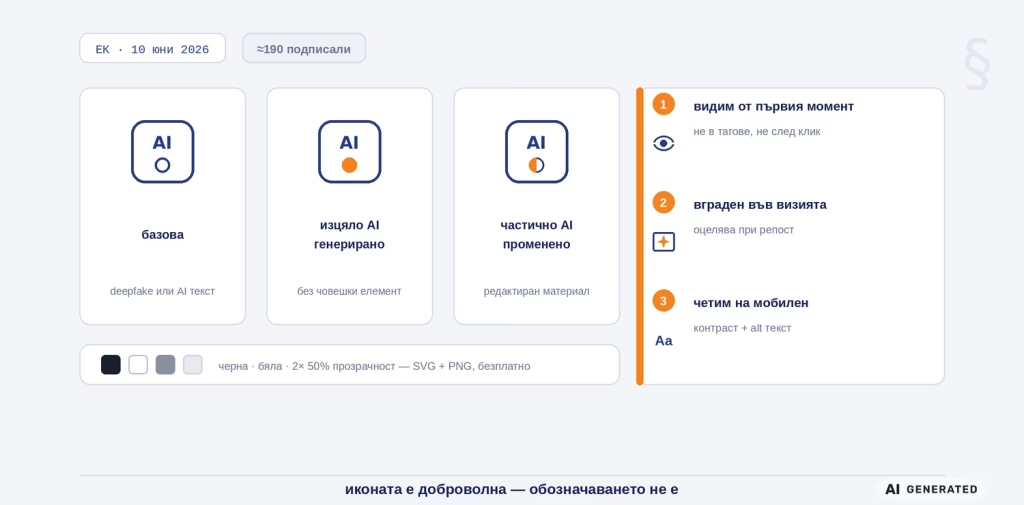
The set includes three icons: a base one, for when AI is involved in deepfake content or AI text; “fully AI-generated,” for when the content has no human element; and “partially AI-altered,” for when existing human material has been edited with AI. Each comes in four variants – black, white, and both at 50% transparency – in SVG and PNG format. They are a free download from the Commission’s page, with no attribution required.
The important clarification: the icons are voluntary, the obligation is not. You can also label with clear text like “Image generated with AI.” The icon wins where text gets in the way of the design or where the audience is multilingual. For audio, where there is nowhere for an icon to sit, the label is a short message at the start of the recording – spoken, or displayed in the player.
The placement rules for how to label AI-generated content are three, and they apply regardless of the label’s format. First, the label is clearly visible no later than the moment a person first sees the content – not in tags, not after a click. Second, it is embedded in the visual or video itself, so that it survives sharing and reposts. Third, it stays readable: contrasting, large enough on a mobile screen, with alt text for screen readers. An 8 px label in the corner that gets lost in compression is labeling in theory only.
C2PA and Content Credentials: The Passport in the Metadata
The second level is invisible to the eye but increasingly important to the platforms. C2PA (Coalition for Content Provenance and Authenticity) is the industry standard for content provenance, and Content Credentials are its consumer-facing side: a cryptographically signed record in the file that says what was created, with which tool, and what was changed afterwards. You recognize it by the small “CR” mark in the corner of the visual on supporting platforms.
The good news for you: you do not write this metadata yourself. ChatGPT and DALL-E attach it to generated images, Adobe Firefly and Photoshop do the same, Google embeds it in Gemini, and new phones like the Pixel record it at the moment of capture. On the other side, TikTok reads Content Credentials and applies an automatic label, LinkedIn displays the “CR” mark, and Microsoft, Meta, and OpenAI stand behind the standard as well. The specification is also on its way to becoming an international ISO standard. In other words, the machine-readable marking of AI content runs without any effort on your part, as long as you do not interrupt it. You can check any file in seconds at verify.contentcredentials.org – upload the visual and see its history.
Your role here is a single one: do not break the chain. Metadata dies with a screenshot, with many export settings, and with uploads to platforms that strip it. So keep the original file with intact Content Credentials as evidence, and embed the visible label separately. And never clean the metadata deliberately: deleting the provider’s marking reads against you in a dispute. The older IPTC standard completes the picture with a field for digital origin – the Code of Practice encourages the two to travel together.
Watermarks: The Invisible Layer of AI Content Labeling
The third level is the watermark: a signal woven directly into the pixels, the sound wave, or the arrangement of words, invisible to a human and readable by software. Unlike metadata, it does not sit “next to” the file but “inside” it, which is why it survives cropping, compression, and most edits.
The most widespread example is SynthID by Google DeepMind. It marks images, video, audio, and text from Gemini, Imagen, Veo, and Lyria, and according to Google data from May 2025, over 10 billion pieces of content have been marked with it. Verification runs through the SynthID Detector portal, for now with priority access for journalists and researchers, while the text version is open source. The other major providers are developing their own watermarks – that is their route to the machine-readable marking that Article 50 assigns to them.
What does this mean for your business? Two things. First, the watermark is not your task: you can neither add it nor remove it, and that is exactly why it does not replace the visible label. Second, the choice of tool is a choice of compliance: a generator that embeds a watermark and Content Credentials does half the AI content labeling for you. For tools placed on the market before August 2, 2026, the regulation gives a grace period for building it in until December 2, 2026 – one more reason to work with the leading tools rather than a random generator with no documentation.
What the Platforms Require Beyond the Law
The AI Act is the floor, not the ceiling. Ad and social platforms have their own declaration rules, which often catch content the regulation does not cover. That is why a working process for how to label AI-generated content has a second row: the per-channel requirements.
| Platform | What it requires | Where the setting is |
| Meta (Facebook, Instagram) | “AI info” label: applied automatically from metadata signals or after your declaration for photorealistic AI content | At publishing and in Ads Manager |
| TikTok | Label for realistic AI content, automatic when Content Credentials are detected; unlabeled clips may be taken down or restricted | “AI-generated content” toggle at upload |
| YouTube | Declaration for realistically altered or synthetic content; for health, news, elections, and finance the label shows on the player itself | Checkbox in Creator Studio at upload |
| Google Ads | Declaring AI content in ads, shown in the “How this ad was made” panel; for EU accounts Google requires it | In the Google Ads account, since July 2026 |
Note the common denominator: self-declaration is the main mechanism everywhere, because the platforms know that metadata gets lost along the way. Do not count on “AI info” appearing on its own – declare wherever the content is realistic.
The Workflow: How to Label AI-Generated Content in 5 Steps
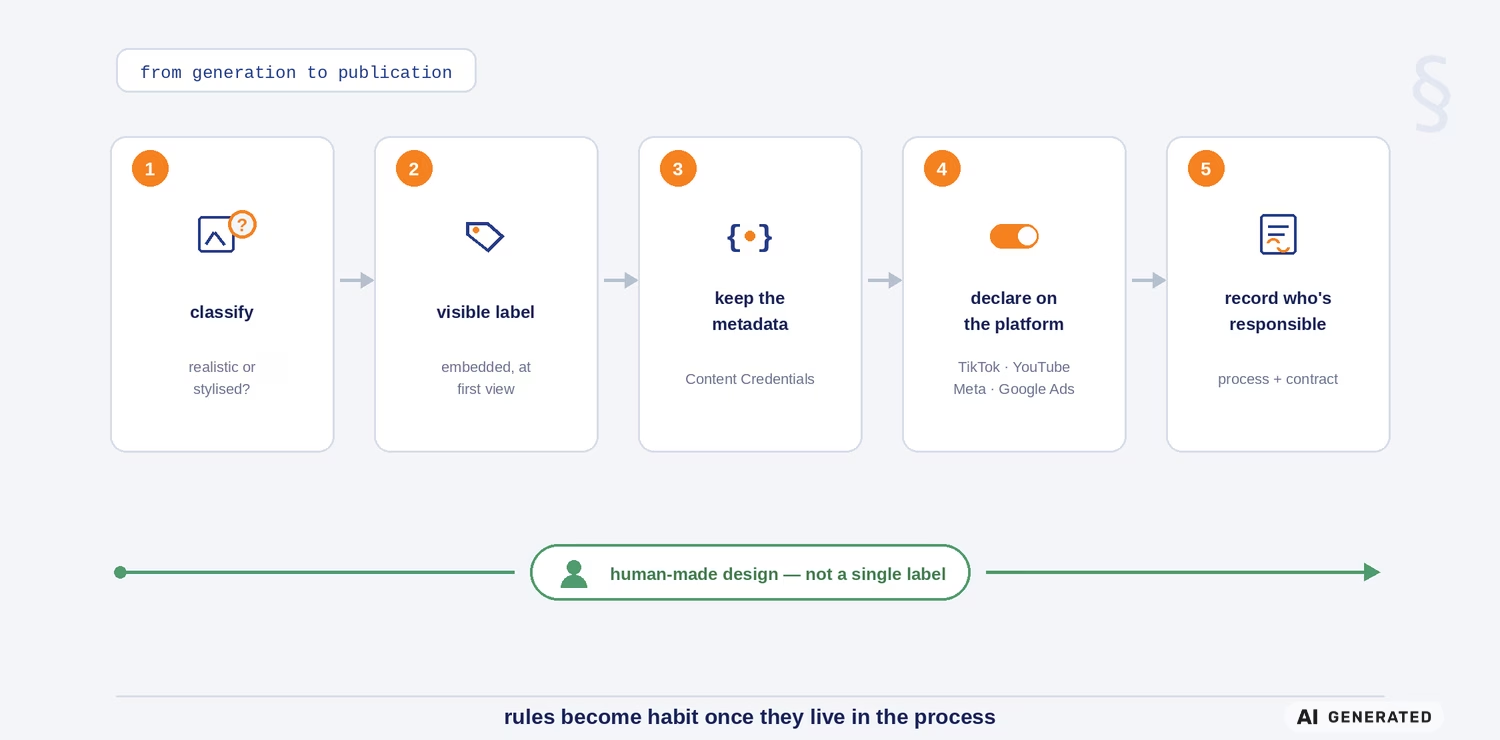
Rules become habit once they enter the process. Here is how to label AI-generated content correctly, from generation to publication:
- Classify the visual. Is it realistic or stylized? When in doubt, treat it as a deepfake – the stricter regime costs you nothing but one notice.
- Apply the visible label. An EU icon or short text, embedded in the visual itself, readable on a phone, present at first view. For video – in the first seconds, not only in the description.
- Preserve the metadata. Keep the original with Content Credentials, do not publish a screenshot instead of the file, and do not clean it on export.
- Declare in the platform. The toggle in TikTok, the checkbox in YouTube, the declaration in Meta and Google Ads – at every upload of realistic AI content.
- Write down who is responsible. One sentence in the workflow and in the contract with every external vendor: who judges, who labels, who declares.
Step 5 is also where the question of commissioned design gets settled. When you order from an agency, ask whether AI enters the project and who takes on the labels. At Prioritex the rule is explicit: visuals and logos are made 100% by a human by default, and AI comes in only by your decision – with correct labeling built into the files themselves. Human design needs not a single label, and that is the shortest path through this whole topic.
The Five Mistakes That Defeat the Labeling
The first weeks after August 2 already show where the chain breaks:
- A screenshot instead of the original. The screen capture wipes the Content Credentials, and the watermark remains the only trace. Publish the file, not its copy taken with the Print Screen key.
- A label only in the description. The post gets shared, the description stays behind. The label lives on the visual or in the frame; otherwise it disappears at the first repost.
- A label after publishing. The requirement is clear labeling at first contact. Added a day later, the label does not fix the violation – it documents it.
- “Cleaning” the metadata for a smaller file. The optimization that removes the provider’s signature turns correct AI content labeling into a potential dispute with a regulator and a platform.
- Relying on the automation. The platforms detect some of the AI content, not all of it. The obligation is yours; the automatic label is only a safety net.
The Label Costs Seconds, Trust Takes Years
The first wave of inspections is only now picking up speed, and that makes this a convenient moment: build correct AI content labeling into your process now, while your competitors are still debating whether it concerns them. The icons are free, the platform declarations take one click each, and an honest label in front of the customer costs less than one explanation after a revelation. And when the design is made by a human, the topic does not come looking for you at all.
Frequently Asked Questions About How to Label AI-Generated Content
Do I have to label a logo or banner generated with AI?
Under Article 50, no: logos, icons, and abstract banners are stylized graphics, no one takes them for a real photo, so no AI content labeling is owed for them. Do check, though, the rules of the platform you publish on, and whether the visual is not in fact photorealistic – that is where the obligation returns.
Is it mandatory to use the EU icons?
No. The icons are a voluntary tool: the law mandates that you label, not how. How to label AI-generated content for deepfakes and AI text on matters of public interest is up to you – a clear text notice does the same job, while the icons give a recognizable common format and save translation.
What happens if the platform strips the file’s metadata?
None of your obligations falls away: the visible labeling of AI content remains your responsibility precisely because metadata gets lost at upload. Keep the original with Content Credentials as evidence and embed the label in the visual itself.
How can I check whether an image was generated with AI?
Upload it to verify.contentcredentials.org to see its Content Credentials history; for files from Google’s tools, the SynthID Detector portal does the job. No result is not a guarantee of authenticity – which is why reliable AI content labeling starts with the one who publishes.