Out of every 100 visitors to an online store, usually two or three buy on the first visit – the rest look around and leave. The figures are ballpark, from international benchmark studies, but the direction is clear: most of the traffic you pay or work for walks away without a trace. Google Ads remarketing is the tool that brings exactly those people back – it shows your ad to visitors who have already been on your site while they read other sites, watch YouTube, or search Google again.
What Google Ads Remarketing Is and How It Works
Google Ads remarketing is the feature that lets you show ads to people who have already visited your site or used your app. Instead of fighting for the attention of strangers, you talk to an audience that knows your brand and has shown interest: viewed a service, read the prices, put a product in the cart.
First, the Google tag goes on your site – a short piece of code that notes every visit. It is installed once, changes nothing in how the site looks, and works without the visitor doing anything.
Second, the tag fills lists (in the platform you will meet them as “data segments”) by rules you set: all visitors from the last 30 days, people who viewed a specific category, visitors who reached the cart but not the payment. This is where the strength of the approach lies: the “abandoned cart” list and the “blog visitors” list are different audiences with different readiness to buy, and they deserve different ads.
Third, you create a google ads remarketing campaign that shows only to the chosen lists, with a separate message for each. The person who looked at a specific model yesterday sees an ad with that model. The person who read an article on choosing a service sees an invitation to the page with examples and prices.
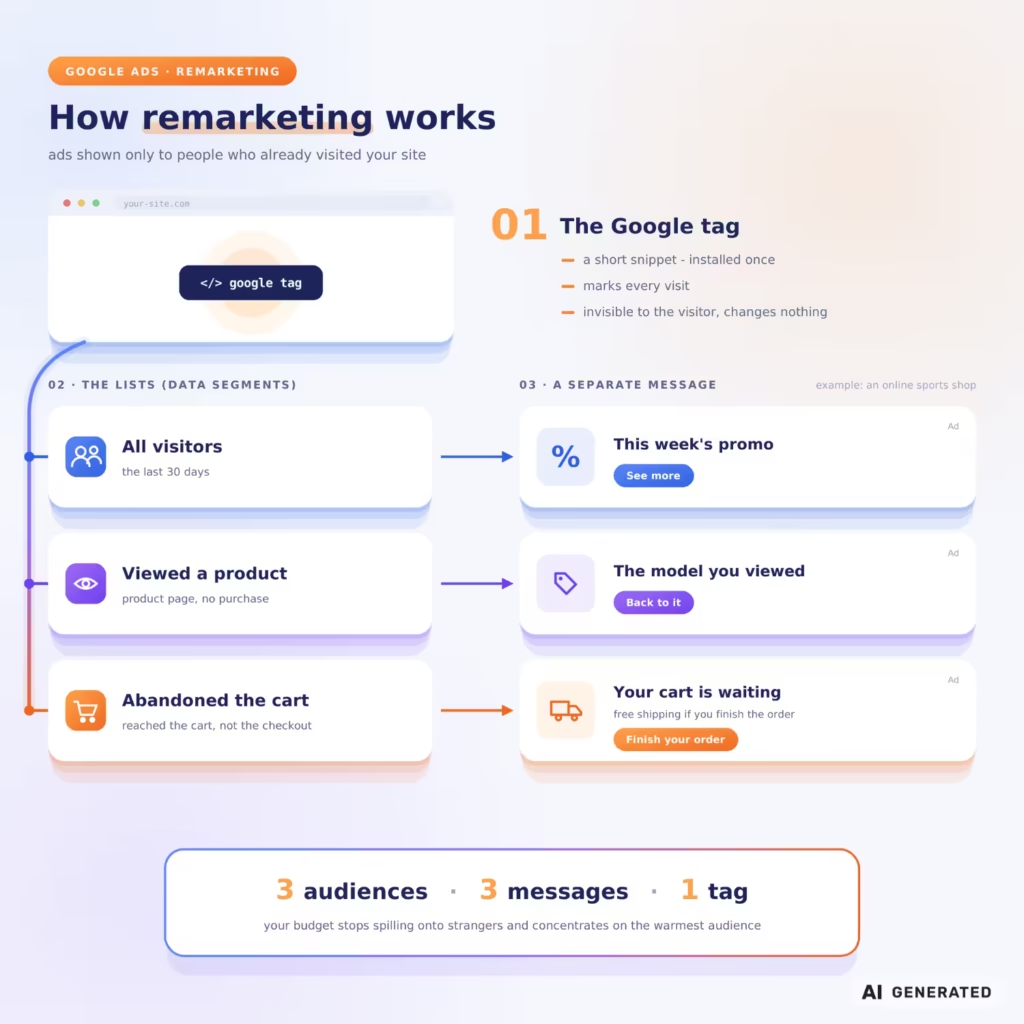
The result: your budget stops spilling toward a random public and concentrates on the warmest part of the audience – the one that has already made the first step on its own.
In practice it looks like this: an online store for sports goods runs three lists – all visitors, people who viewed a product page, and abandoned carts. The first group sees a general banner with the current promotion, the second – banners with the exact products they viewed, the third – a reminder with a free-shipping code for completing the order. Three audiences, three messages, one tag.
Google ads Remarketing or Retargeting: What Is the Difference
In practice – none that concerns you. Retargeting is the industry’s older term, and remarketing is the name Google chose for its version of the technique. Some authors split them: retargeting for the banners to past visitors, remarketing for the emails to existing customers. In day-to-day work with Google Ads, though, the two words describe the same thing – advertising to people who have already found you once. If you read guides from elsewhere, do not try to keep the two apart – everything runs through the same lists and the same campaigns. In this article we use Google’s term.
The Types of Google Ads Remarketing
Google Ads offers several formats that cover different places and different moments of the customer’s path. The choice depends on what you sell and where your audience is. What all Google Ads remarketing formats share is that they stand on the same tag and the same lists, so an audience collected once works in every format.
Standard Remarketing on the Display Network
The classic banners the visitor then sees across the sites and apps in Google’s network, from news sites to mobile games. The format maintains presence – the person has viewed your service, and over the following days your brand stays in front of their eyes while they compare options.
Dynamic Remarketing
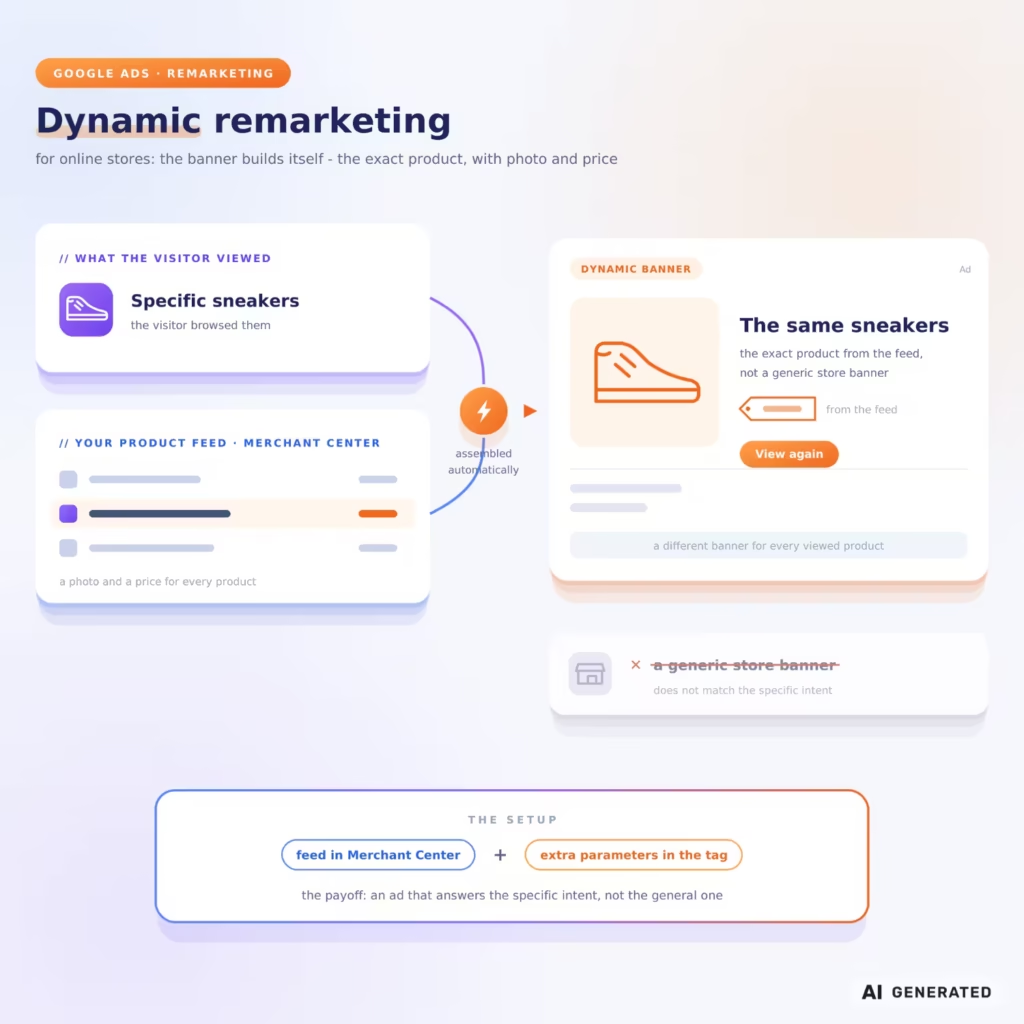
A step further for online stores: the banner assembles itself automatically and shows the exact product the visitor viewed, with a picture and a price from your product feed. You looked at specific sneakers – you see the same sneakers, not a general banner for the store. The setup requires a feed in Merchant Center and extra parameters in the tag, but the payoff is an ad that answers the specific intent, not the general one.If there is no reply, one reminder after 5-7 days is enough. A second makes no sense – silence is an answer too, and your list of sites should be longer than one editor’s patience.
Google ads Remarketing in Search (RLSA)
The lists work in Search campaigns too. When a past visitor searches Google again, you can bid higher for them, show them different copy, or open broader keywords only for that audience. The reason: a person who has been on your site and searches again for “accounting services Sofia” is worth more than a stranger with the same search.
Video Remarketing on YouTube
It works in both directions: you collect lists of people who have watched your videos or your channel, or you show video ads on YouTube to your site’s visitors. A strong format for longer decision cycles – services and products the client researches for weeks before choosing.
Customer Lists (Customer Match)
You upload your customers’ email addresses, collected with consent; Google matches them to accounts, and you advertise to them in Search, YouTube, and Gmail – or exclude them when you are after new customers only. Formally this is targeting by customer base, not by visit, but in practice the two go together.
| Type | Where it shows | Who it is for |
|---|---|---|
| Standard | Sites and apps on the Display Network | Maintaining presence after a visit |
| Dynamic | The Display Network, with the exact viewed product | Online stores with a product feed |
| In Search (RLSA) | Google search results | Past visitors who search again |
| Video | YouTube | Longer decisions, building trust |
| Customer lists | Search, YouTube, Gmail | An existing customer base |
The lists you collect once work beyond the classic campaigns too: Performance Max and Demand Gen take them as audience signals. And Google advertising is moving into new formats as well – how ads in Google AI Mode and ChatGPT work is something we have covered separately.
When Google Ads Remarketing Pays Off and When It Does Not
Google Ads remarketing gives the most when the site already has traffic and the conversions lag behind. Three situations repeat most often in our practice.
An online store with abandoned carts: the person reached the last step and something stopped them – the shipping cost, a missing payment method, a phone call in the middle. A reminder with the exact product wins back part of those orders.
Services with a long decision cycle: B2B, four-figure repair jobs, accounting, translations. The client collects quotes for days or weeks, and all that time the competitors are one click away. Presence through that period wins the inquiry.
Businesses with repeat purchases: consumables, cosmetics, pet food. A list of past buyers plus a reminder at the right moment costs less than acquiring a new customer.
There are also cases where we would not bet on this technique. A brand-new site with no traffic has nothing to fill the lists with – below Google’s minimum, ads do not show, so traffic from search and SEO comes first. One-off emergency services do not win either: the locksmith people search for at 2 a.m. takes the client from the search results, not from a banner the next day.
And a word on expectations: the return is not magic. The lists are a small audience compared to broad search, so the campaigns toward them are rarely the big spend in the account – they are the addition that lifts the overall return. With a few thousand visitors a month, think hundreds of impressions a day to the right people, not a new main channel.
The good news for the budget: clicks from display remarketing are usually among the cheaper ones in an account. We have broken down how much Google advertising costs by format and industry in a separate article.
What You Need to Get Started
The list of requirements is short, but each item blocks the campaign if it is missing.
The Google tag on the site. Installed once – directly in the code or through Google Tag Manager. If you already use Google Analytics 4 and the accounts are linked, the lists can also fill from Analytics data.
Consent and Consent Mode v2. Since March 2024, Google requires a consent signal through Consent Mode v2 for the European Economic Area: without it, the lists do not fill, no matter how much traffic the site has. In practice this is the number one reason for empty remarketing lists – the cookie banner sits on the site but does not pass the signal to the tag. The check takes minutes and saves months of confusion.
A minimum audience. For ads to start showing, the list must reach at least 100 active users in the last 30 days – the threshold applies to the Display Network, Search, and YouTube under Google’s official documentation.
Membership duration. How long a person stays on the list is up to you: 30 days by default, 540 at most. Tie it to the purchase cycle – for food delivery, 3 days are more than enough; for choosing an ERP system, even 90 may be too few.
Segments and exclusions. Start with two or three lists: all visitors from the last 30 days, people who viewed the key pages with prices or products, abandoned carts. And from day one, exclude those who have converted from the campaigns for new customers – an ad to a person who has already bought the same thing is money spent for no reason.
Conversion tracking. Set it up before the start google ads remarketing, not after. Without tracking orders, inquiries, or calls, there is no way to tell whether the campaign brings back buyers or just walks around the site – and budget decisions are made on those numbers. The link between Google Ads and Analytics brings one more thing: ready-made behavior segments you would otherwise build by hand.
One limitation to close with: for categories Google treats as sensitive – health conditions, personal hardships, and others – personalized lists are not allowed. If you work in such a field, check the policies before planning the campaign around them.
The Common Mistakes That Drain the Budget
No frequency cap. A banner that shows up 40 times a day does not persuade – it stalks. Cap the impressions per person and rotate the visuals before fatigue turns interest into irritation.
One message for all lists. The cart abandoner needs a reminder and an easier path; the blog reader needs a reason to look at the service. The same sentence to both wastes the point of segmenting. What message each stage hears is a matter of communication strategy and brand tone, not of happy accident.
Buyers staying in the campaign. The most expensive ad is the one shown to a person who has already bought the product. Exclusion lists are a minutes-long setting.
A window detached from the purchase cycle. Too short – you miss the slow decisions; too long – you pay for interest that went cold long ago. A store for everyday goods has no business with a 180-day list, and a B2B service with a two-month quote cycle loses clients with a 14-day one.
All visitors in one bucket. The visitor who left after two seconds and the visitor who read the prices for five minutes are not one audience. At the very least, split the lists by depth of visit – time on page, the number of pages viewed, and reaching the cart are ready-made signals for it.
And the last one, the most expensive: expecting Google Ads remarketing to fix a weak offer. It brings people back to the page – if the page does not convince, you are returning traffic to the same leak. First the offer and the page, then the reminder.
The Second Chance Most Sites Miss
The first visit rarely sells. The difference between a site that grows and a site that treads water is often in what happens with the ninety-odd percent who looked around and left. Google Ads remarketing is the mechanism that brings them back with the right message, at the right stage, at a price lower than the one for a new visitor.
If you have traffic but the inquiries are not coming, we will review your site and your ad account and show you where bringing visitors back will add the most revenue.
FAQ About Google Ads Remarketing
How Many Visitors Do You Need to Start a Google ads Remarketing Campaign?
The list must reach at least 100 active users in the last 30 days for ads to start showing – the requirement applies to the Display Network, Search, and YouTube. A site with a few thousand visits a month builds a working Google Ads remarketing list in days.
Is Ggoogle ads Remarketing Cheaper Than Search Advertising?
Usually yes: remarketing clicks on the Display Network most often come out cheaper than Search clicks for the same business, and returning visitors convert better than new ones. The exact figures depend on the industry – the numbers from international benchmark studies are a guide, not a guarantee.
Is Google Ads Remarketing Legal Under the GDPR?
Yes, with a correct setup: a consent banner connected to Consent Mode v2 and a clear cookie policy. A visitor who declines consent does not enter the remarketing lists and sees no personalized ads.
Does the Approach Work for Services, or Only for Online Stores?
It works for both. For services with a long decision cycle, remarketing keeps the brand in front of the client through the whole period of comparing quotes – which is exactly where the inquiries are won.