Every Google search starts with a phrase your potential client types. If you do not know what those phrases are, you are optimizing blindly – and often for terms nobody searches for. Keyword research answers three questions: what people search for, how often, and with what intent. And for all three answers you do not need paid software – the core tools for keyword research are Google’s own: they are free, and the data comes straight from the source.
What Keywords Are and Why They Decide Who Finds You
A keyword is the phrase a person types into the search engine: “roof repair price,” “accounting firm Plovdiv,” “how to issue an invoice.” When we talk about keywords in SEO, we mean the phrases you want your page to show up for in the results – the ones you build its content around.
And here is the first catch: not all searches are equal. Behind “what is seo” stands a person who is reading and learning. Behind “seo agency price” stands a person who is comparing quotes and is ready to pay. The first search is informational, the second – commercial. Beyond them there are navigational searches (looking for a specific site or brand) and transactional ones (“buy used laptop”), where the decision is already made.
Volume shows how many people search; intent shows whether any of them will become your client. And the more specific the phrase, the closer the person behind it is to a decision. Compare “website” with “online store website development price” – the second search is long and low in volume, but the person behind it is already choosing a provider.
A page that ranks for a phrase with 50 searches a month and clear purchase intent often brings more inquiries than a page with 5,000 visits from curious readers. That is why the goal of keyword research is not the most searched word but the most precise one – the one where real volume, competition you can beat, and an intent that leads to your service or product all meet.
Five Free Keyword Research Tools
The five tools below cover the whole keyword research process – from the first idea to the finished list. None of them covers everything on its own – combine them, because each shows a different part of the picture.
1. Google Keyword Planner: Volumes, Trends, and Cost per Click
Google Keyword Planner is the source of much of the volume data you see in the paid platforms too. Access is free: you need a Google Ads account, but no active campaign and no ad spend. You will find it in the Tools menu of the account.
The “Discover new keywords” function takes a starting phrase or a URL, including a competitor’s, and shows hundreds of related suggestions with search volume, year-over-year trend, competition, and the range of bids per click.
Be careful with the Competition column – it is an ads metric, not an SEO one. It says how many advertisers bid on the word, not how hard it is to rank organically. The bid per click, on the other hand, is an excellent signal of value: in our keyword research, the phrase “реклама в гугъл цена” (Google ads price) showed a top-of-page bid above 6.5 EUR per click – where businesses pay sums like that, there are real clients behind the word.
The reverse is a signal too: high volume with zero bids often means curiosity with no money behind it. And if after the research you decide to run ads as well, see how the match types in Google Ads work – they decide which of those searches you actually show up for.
2. Google Search Console: The Words People Already Find You By
If your site is more than a few months old, Search Console is the first place to check – a fully free service, with data on your own traffic up to 16 months back. If you have not connected it yet, verifying ownership takes minutes with a DNS record or a snippet in the site’s code. The Performance report shows which queries you appear for in the results, how many impressions and clicks you get, and at what average position you stand.
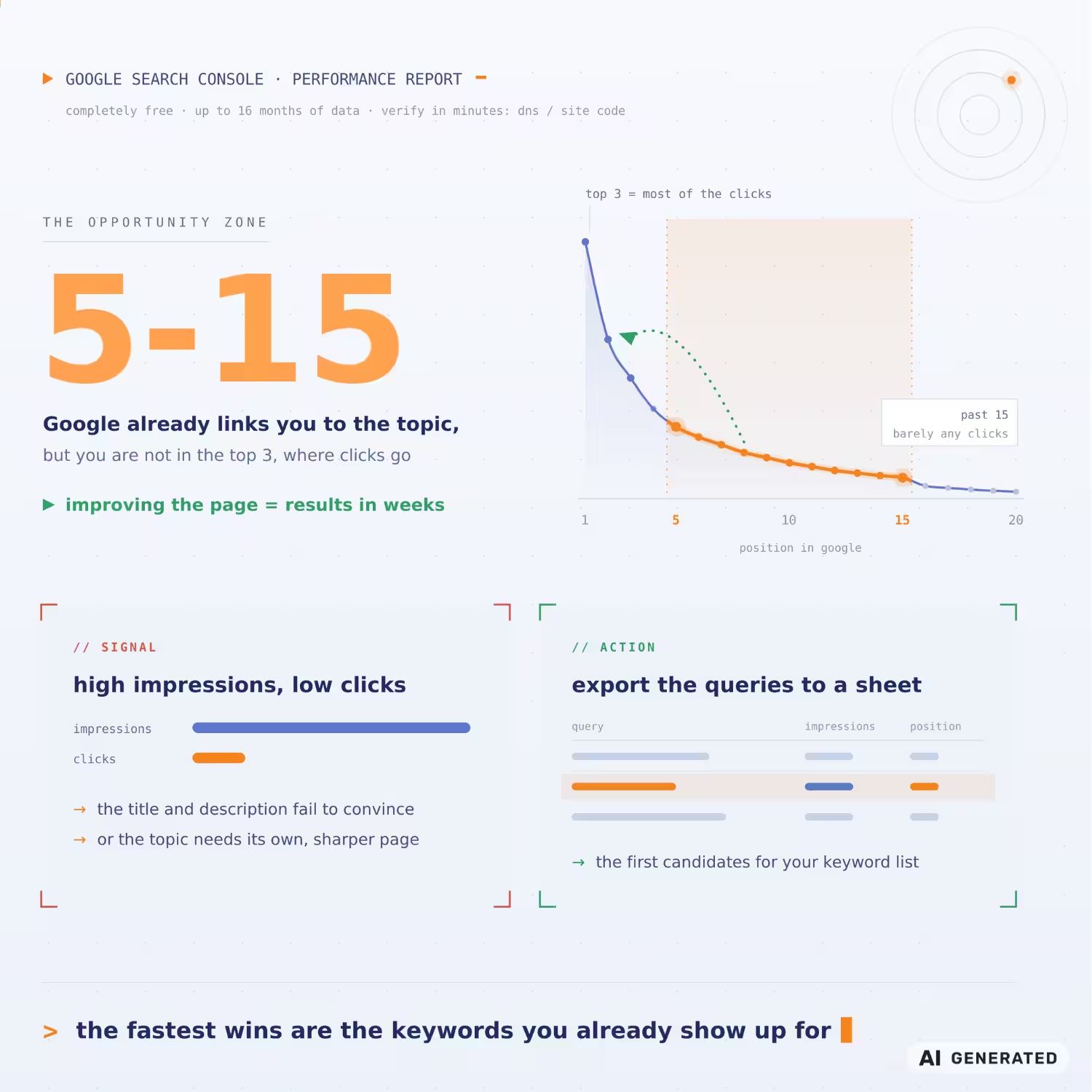
The most valuable queries are those at positions 5-15: Google already connects you with the topic, but the page is not in the top 3, where most of the clicks go. Improving such a page often shows results within weeks. Also look at the queries with many impressions and few clicks – they hint that the title and description do not convince, or that the topic deserves a separate, more precise page. Export the queries into a spreadsheet – they are the first candidates for the keyword research list below.
3. The Hints in the Search Itself: Autocomplete, “Related Searches,” and “People Also Ask”
The most underrated source is the search engine itself. Start typing a phrase, and autocomplete shows real wordings people are using right now. At the bottom of the results page sit the “Related searches,” and the “People also ask” block gives ready-made questions for an FAQ section or for a whole article. After the main phrase, add letters one by one or a question word – “why,” “how much,” “how.” Every combination pulls out a new row of real searches. Write the wordings down verbatim.
These hints give no volumes, but they give something the numbers cannot – the client’s language. Whether people write “website development” or “making a website,” “price” or “how much does it cost” – the exact wording is the difference between content that sounds like the client and content that sounds like jargon.
4. Google Trends: Direction and Seasonality
Google Trends does not show search counts but relative interest from 0 to 100 over time. That is exactly why it is useful – you see whether a topic’s searches are on the rise and when in the year interest peaks.
In practice, Trends does two jobs in keyword research. First, seasonal planning: if the search for your service peaks in March, the content needs to be online back in January, because ranking takes time. Second, choosing between wordings: with two close phrases, the comparison shows which one is picking up speed before the difference appears in the planner’s volumes. The check takes a minute and saves months of writing in the wrong direction.
5. AnswerThePublic: The Questions Around the Topic
AnswerThePublic collects autocomplete hints and arranges them by questions, prepositions, and comparisons around your topic, with a choice of country and language. As of now, the free account allows 3 searches a day – enough for one topic daily.
The value is in the speed – in minutes you see dozens of questions you would otherwise collect by hand, letter by letter. For the Bulgarian market, verify the wordings you find through autocomplete as well.
| Tool | What it gives | When to use it |
|---|---|---|
| Keyword Planner | Volumes, trends, and bids per click for Bulgaria | The core keyword research and prioritization |
| Search Console | The queries you already show up for | Quick wins on existing pages |
| Google’s hints | Real wordings and questions | The client’s language, content ideas |
| Google Trends | Direction and seasonality of interest | Planning content over time |
| AnswerThePublic | The questions around the topic in one place | Structure for articles and FAQ sections |
How to Choose Keywords That Bring In Clients
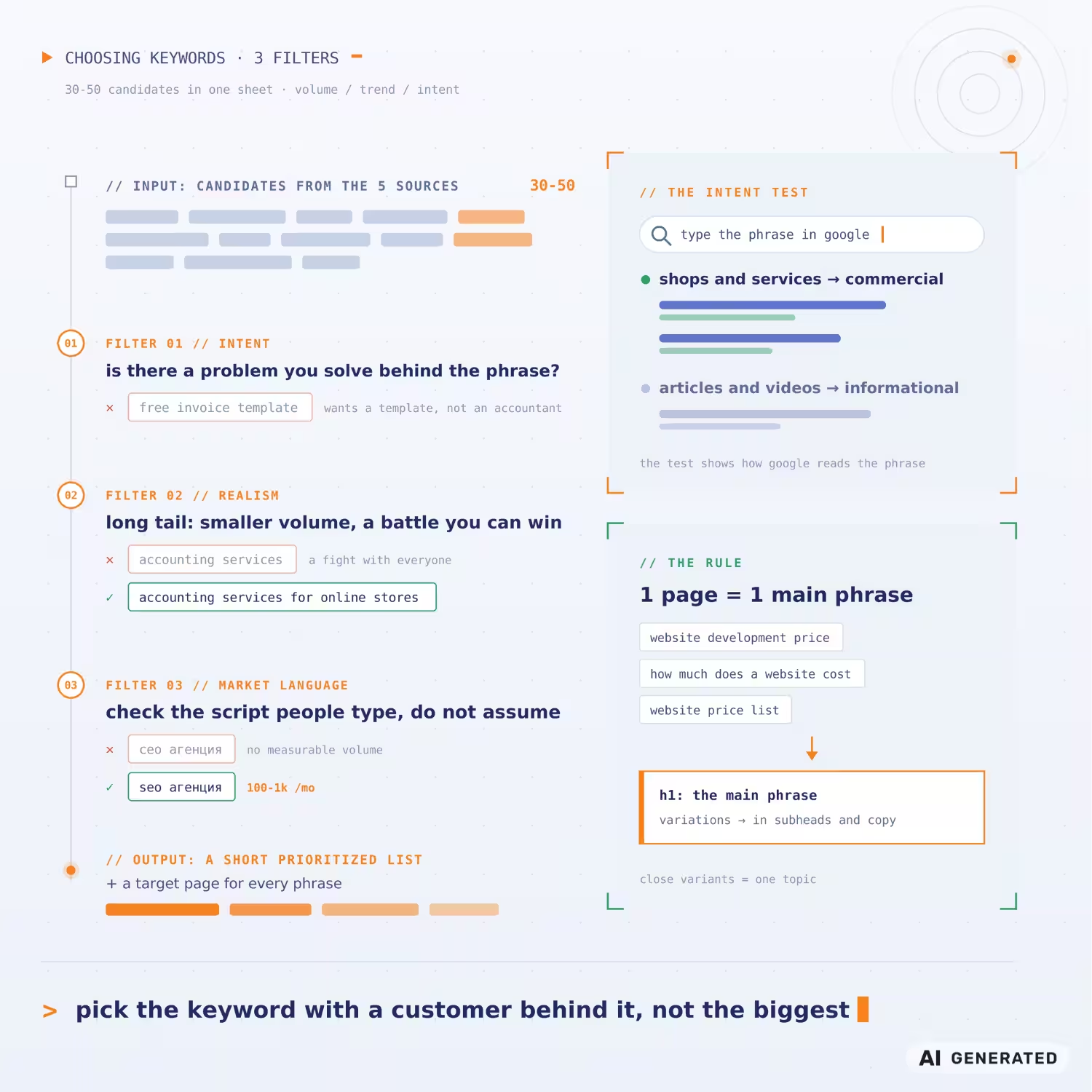
Collect 30-50 candidates from the five sources into one table – with volume, trend, and intent for each phrase. You judge intent with a test: type the phrase into Google and see what ranks. If the results are shops and services, the intent is commercial; if they are articles and videos – informational. This test is worth more than any metric, because it shows how Google reads the phrase. Then choose the keywords according to your goals.
The first filter is intent. Keep the phrases with a person behind them whose problem your business solves. “Free invoice template” collects traffic, but the searcher wants a template, not an accountant.
The second filter is realism. For a word that national portals and marketplaces fight over, a new site will not rank any time soon. Longer phrases – the so-called long tail – have lower volume but weaker competition and clearer intent. “Accounting services” is a battle against everyone; “accounting services for an online store” is a battle you can win with less effort.
The third filter is the language of the market. When we did the keyword research for our blog in September 2026, Keyword Planner showed “сео агенция” (seo agency with “seo” written in Cyrillic) with no measurable volume, and “seo агенция” (the same phrase with “seo” in Latin script) at 100-1K searches a month. “Скорост на сайта” (site speed in Bulgarian) – practically zero; “pagespeed insights” – thousands. The Bulgarian user searches for technical terms in Latin script, and that is something you verify, not assume.
The result of the keyword research is a short list of phrases, ordered by priority, with the page that will target each one written next to it. The rule: one page – one main phrase with its variations. Group close wordings into one topic: “website development price,” “how much does a website cost,” and “website prices” are one page, not three – the main phrase goes into the title, the variations into the subheadings and the text. This list also sets the investment. How volume and competition affect the price of SEO optimization is a topic we have covered separately.
The Mistakes That Defeat Keyword Research
Chasing volume without intent is the first. The second is translation: a list of English words run through a translator is not keyword research. Volumes and wordings do not transfer between markets, as the Latin-script example above showed. The fact that a topic is booming in the US does not mean there is search demand in Bulgaria – check every phrase in the language of its market.
The third is cannibalization. Several pages on the same phrase get in each other’s way, and Google hesitates over which one to show. So assign the phrases by the rule above and check in Search Console whether two pages take turns for one query – the alternation is a sure sign that Google cannot tell which one is the main page.
The fourth is the mindset. Search moves: phrases die, new ones gain volume. In the September keyword research, several AI phrases were growing by a triple-digit percentage for the year, while terms that until recently looked settled were losing their entire volume. A review every few months keeps your list alive.
Keyword research does not work in isolation. Even the most precise list of keywords will not help if Google cannot crawl and understand your site – which is why we start every project with an SEO audit of the site that shows the technical obstacles before you invest in content.
From Keyword Research to a Plan
Keyword research is half the job. The other half is turning the list into structure: which page targets which phrase, what content it needs, and how you will measure the result after three months in Search Console. If that part feels foggier than the keywords themselves, that is exactly where experience makes the difference – which battles to pick first and what content wins each of them.
Not sure which words will work for your business? We will review your site and show you where to start.
FAQ About Keyword Research
Are the Free Tools Enough for Keyword Research, or Do You Need a Paid Platform?
For a start, and for small and midsize sites, the free SEO tools cover keyword research in full: volumes and trends from Keyword Planner, real queries from Search Console, wordings from the hints. The paid platforms add SEO competition scores, historical data, and competitor analysis – they make sense once the volume of work justifies the cost.
How Many Keywords Should One Page Target?
One main phrase and its natural variations. Separate keywords with different intent deserve separate pages – otherwise none of them ranks reliably.
How Often Should You Redo Keyword Research?
Review the list every 3-6 months and with every new service or product. Volumes move, and new keywords appear with every shift in the market; wait a year, and you may find you are writing for phrases nobody searches anymore.